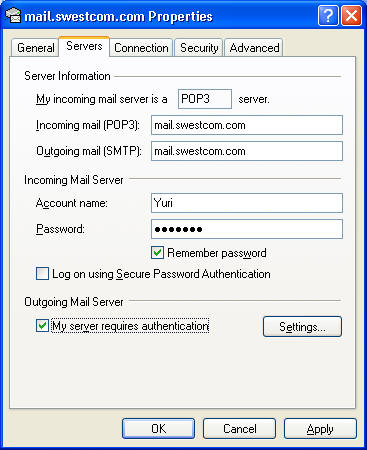
Please, check that you selected "My server requires authentication" option for outgoing (SMTP) server.
If this option is already selected, but you still can't send e-mail, probably, your Internet provider blocked port 25. Please, refer article "My Internet provider blocks port 25, how can I send e-mails?"
Select menu Tools/Accounts and select your e-mail account. Press Properties button and select "Servers" tab.
Mark "My server requires authentication" box. Press "Apply" button. Press "OK" and "Close" buttons.
For Windows Mail:
Select menu Tools/Account and select your e-mail account. Press Properties button and select "Servers" tab.
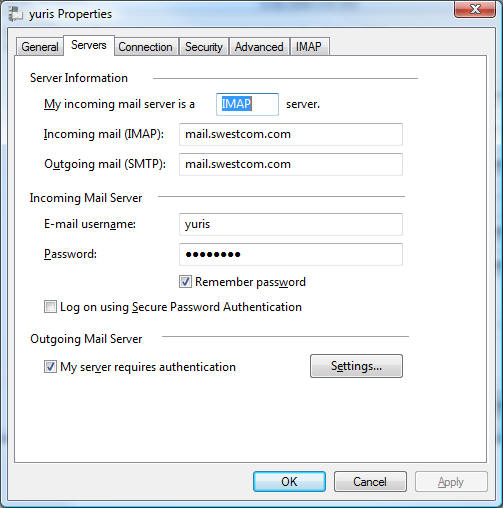
Mark "My server requires authentication" box. Press "Apply" button. Press "OK" and "Close" buttons
For Outlook 2003/2007
Select menu Tools/Account Settings. Select your POP3/IMAP account and select "Change" button
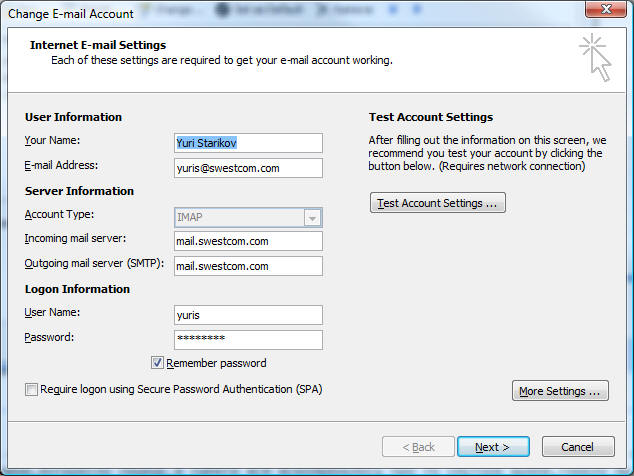
Press "More Settings..." button. Select "Outgoing Server" tab
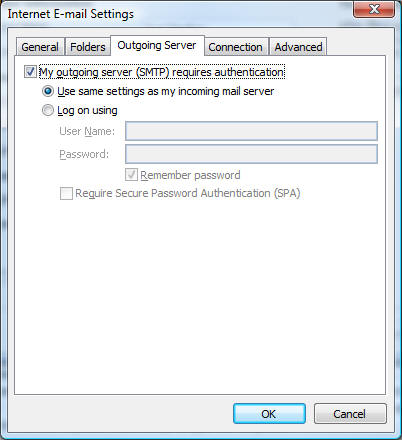
Mark "My outgoing server (SMTP) requires authentication" checkbox. Press "OK", "Next", "Finish" and "Close" buttons.